A crystal head is a plastic connector that can be inserted in a fixed direction and automatically prevents falling out, commonly known as a "crystal head." The professional term is RJ-45 connector (RJ-45 is a network interface specification, similar to the RJ-11 interface, which is the "telephone interface" we commonly use to connect telephone lines). It is called a "crystal head" because of its clear and shiny appearance. Crystal heads are used for field termination between devices or within a horizontal subsystem, and the shell material is made of high-density polyethylene. Each twisted pair cable is connected to a network card and a hub (or switch) by installing crystal heads at both ends.
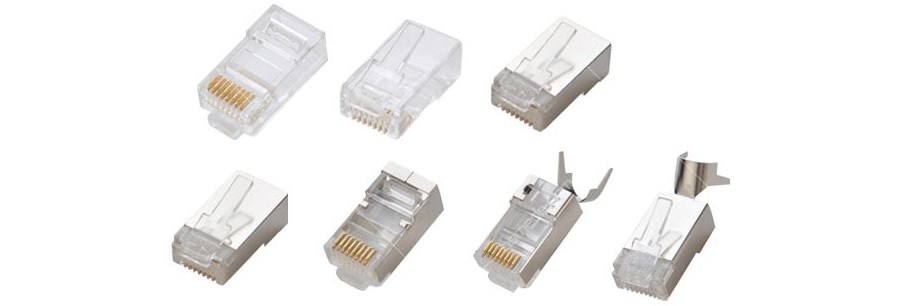
Types of Crystal Heads
RJ-45
RJ-45 connectors: Each twisted pair cable is connected to a network card and a hub (or switch) by installing RJ-45 connectors (commonly known as crystal heads).
The RJ-45 plug is a plastic connector that can only be inserted in a fixed direction and automatically prevents falling out. Both ends of the twisted pair must have this type of RJ-45 plug installed to connect to the RJ-45 interface on a network card (NIC), hub, or switch for network communication.
RJ11
The RJ11 interface is very similar to the RJ45 interface but has only 4 pins (RJ45 has 8). In computer systems, RJ11 is mainly used to connect modems.
In everyday use, RJ-11 is commonly found in telephone lines.
CAT6A
CAT6A crystal heads are divided into an unshielded integrated, unshielded split, shielded integrated, shielded split, etc.
Order of Connecting Crystal Heads
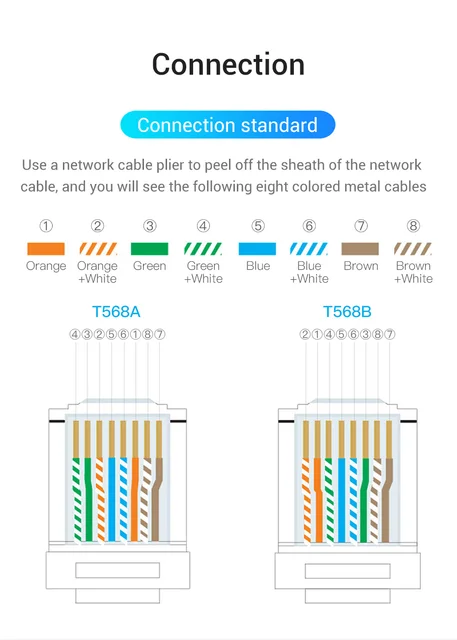
To connect a network cable crystal head, you need a cable tester, two crystal heads, one network cable, and a network cable crimper. Use the network cable crimper to strip about 3 centimeters of the network cable and separate the twisted pairs.
Then arrange them in order from left to right: white-green, green, white-orange, blue, white-blue, orange, white-brown, brown. Use the network cable crimper to trim the arranged wires neatly, take out the crystal head with the copper side facing up, and insert the network cable into the crystal head.
Then use the network cable crimper to press down the copper pieces of the crystal head firmly. You can apply more force when pressing the copper pieces; don't be afraid of damaging them. Many beginners who make network cables often fail because the copper pieces are not pressed tightly enough.
Then use the same method to connect the crystal head on the other end, insert the finished network cable into the cable tester, and if the green lights on the tester light up in sequence, it means the network cable has passed the test and has been successfully made.